
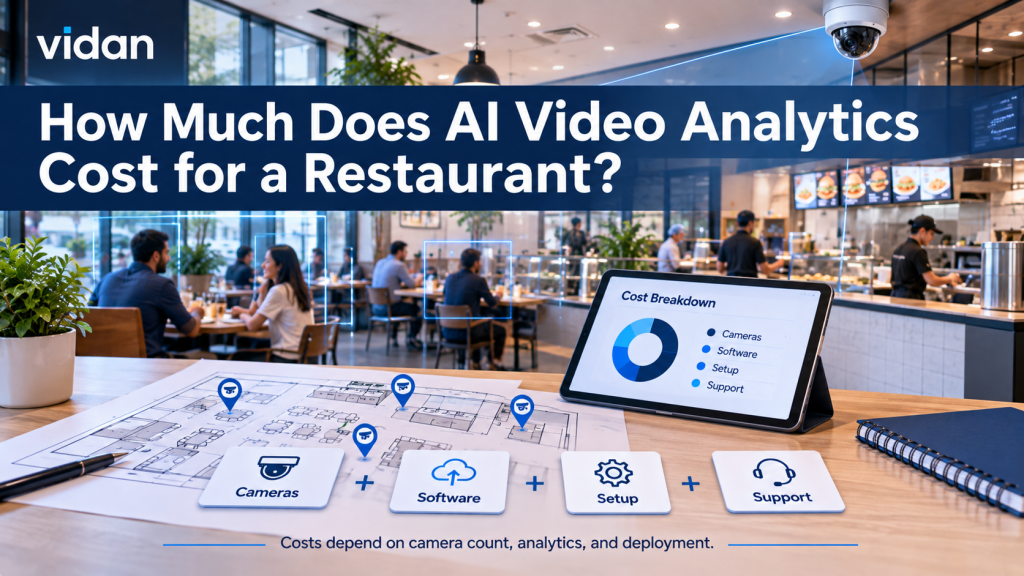
Most restaurants keep only 3% to 5% of sales as profit. AI video analytics for restaurant teams costs $10 to $100 per camera each month. Price it like a payroll line, not a gadget.
Quick answer: A 10-camera restaurant pays about $100 to $1,000 monthly when it reuses existing cameras. New cameras add $150 to $400 each. Pricing model, storage, and monitoring hours decide where you land.
This guide splits the bill into four layers. You will see public price points, three example setups, and a break-even formula. Every range is an estimate, so use it for planning, not as a quote.
Key Takeaways
- Software on existing cameras runs about $10 to $100 per camera monthly.
- Per-location plans start near $40 to $175 monthly.
- Per-minute cloud billing can reach $4,320 per camera monthly. Avoid it.
- Most compatible IP cameras need no replacement.
- Retention days and contract length quietly move your price.
- Break-even needs you to recover only a share of yearly losses.
How Much Does AI Video Analytics for Restaurant Operations Cost?
A restaurant does not need the same monitoring setup as a 50-location QSR chain. The right budget depends on what management needs to see. A single location might need entry monitoring, queue detection, and kitchen oversight. A larger operation might need multi-location reporting, event detection, and centralized alerts.
There are three common pricing models.
1. Analytics Added To Existing CCTV
Lower initial investment
This model adds AI capabilities to compatible cameras and existing recording infrastructure. Typical software estimates range from $3 to $15 per camera per month. A 12-camera restaurant could spend $36 to $180 monthly.
The existing recorder, network, and camera infrastructure may remain in place. Compatibility checks and integration work can still create setup costs.
2. Full Cloud Video Surveillance with AI
Software and storage included.
Cloud platforms combine camera connectivity, recording, storage, alerts, and analytics. A reasonable planning range is $30 to $110 per camera monthly for a full AI-enabled service. A 12-camera restaurant could budget $360 to $1,320 monthly.
Actual prices depend on recording quality, retention periods, and included analytics. Some providers also charge for gateways or proprietary cameras.
3. Custom enterprise analytics
Quote-based deployment
Large restaurant groups may need custom detection rules, integrations, and centralized reporting.
For example, a franchise might want to compare queue activity across 30 locations. It may also need different alert rules for drive-through lanes and kitchens. These deployments require a technical assessment. Pricing depends on camera volume, infrastructure, integrations, and reporting requirements.
One useful distinction: AI software and CCTV equipment are separate budget items. Do not compare a software subscription with a complete camera installation quotation.
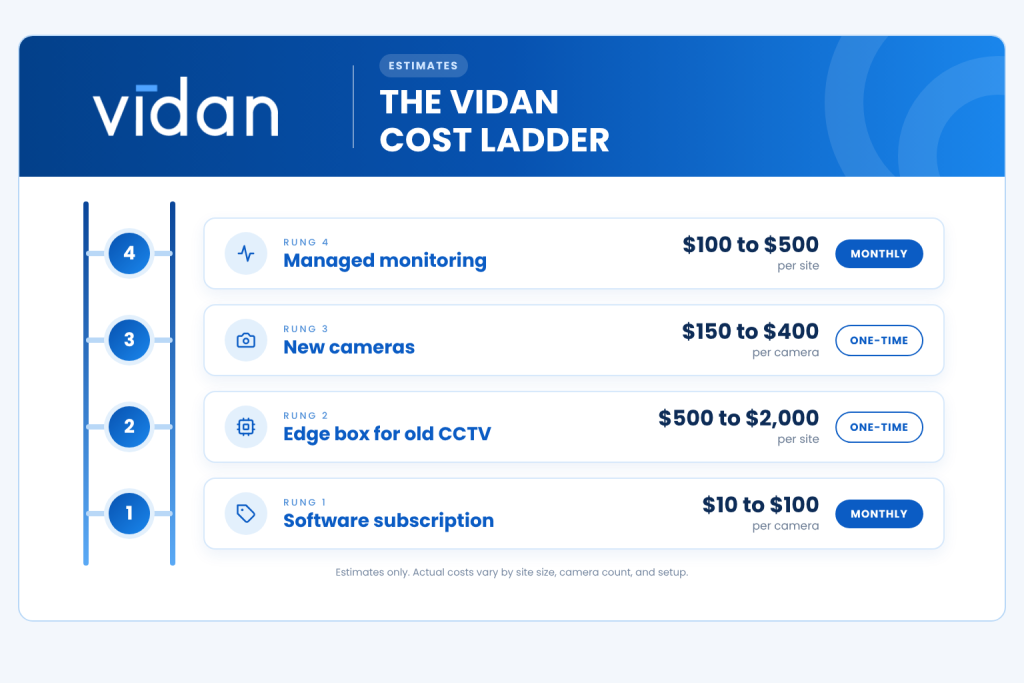
Start at Rung 1 and climb only as far as your risk requires. Your true AI video analytics cost is the sum of the rungs you choose.
What Is Included in Restaurant Video Analytics Pricing?
A quotation should explain what the restaurant receives for its monthly payment.
| Cost component | What it covers |
| AI software | Detection, tracking, and event analysis |
| Camera connectivity | Connecting compatible camera feeds |
| Cloud storage | Saving recordings and event clips |
| Processing | Running analytics on live footage |
| Alerts | Notifications for selected events |
| Dashboard | Reviewing events and performance |
| Integration | Connecting existing systems |
| Support | Technical assistance and maintenance |
Not every provider includes all these services. For example, one subscription might cover analytics but exclude cloud recording. Another might include storage but charge extra for advanced detection. Ask providers to separate recurring charges from one-time expenses.
What Factors Affect the Cost of AI Video Analytics?
Two restaurants with identical camera counts can receive very different quotations. Their monitoring requirements may be completely different.
Here are six factors that influence the final price.
1. Number Of Connected Cameras
Most providers calculate subscriptions using connected camera feeds. More cameras mean more video streams to process. Some providers offer volume discounts for larger deployments.
A restaurant with six cameras may need a smaller subscription. A franchise with 100 cameras may qualify for negotiated pricing.
2. Analytics Features And Detection Requirements
Basic motion detection costs less than advanced operational monitoring. Consider these examples:
| Restaurant Requirement | Analytics Needed |
| Monitor entrances | People detection and counting |
| Identify queue buildup | Queue and occupancy analysis |
| Review cash register activity | Defined event detection |
| Monitor kitchen activity | Zone and behavior monitoring |
| Track customer movement | Dwell time and traffic analysis |
| Monitor restricted areas | Unauthorized entry alerts |
Each additional feature may require different processing resources or configuration.
3. Cloud Versus Local Processing
Cloud processing sends video streams to remote infrastructure for analysis. This can create bandwidth and storage expenses.
Edge processing analyzes footage locally. It can reduce continuous video transfers and cloud dependency.
Some deployments combine local processing with cloud dashboards. This approach depends on available infrastructure and the required analytics.
4. Video Storage And Retention
Keeping recordings for seven days costs less than retaining footage for 90 days.
Storage requirements depend on:
- Camera resolution.
- Number of recording hours.
- Video compression.
- Recording frequency.
- Retention period.
- Number of cameras.
Ask whether the subscription stores continuous footage or selected event clips. This distinction can change the monthly bill.
5. Existing Camera Compatibility
Can restaurants use existing CCTV cameras for AI analytics? Yes, provided the camera feeds meet the platform’s technical requirements.
IP cameras with supported RTSP streams or ONVIF compatibility can offer integration options. ONVIF documentation describes standardized video streaming and analytics capabilities. Older analog systems may require encoders or recorder upgrades.
Camera placement matters too. Poor lighting, blocked views, and unsuitable angles can affect detection results.
6. Number Of Restaurant Locations
A single restaurant needs monitoring for one site. A franchise needs consistent reporting across multiple locations.
Multi-location deployments may require:
- Centralized dashboards.
- Location-specific permissions.
- Different alert configurations.
- Cross-location reporting.
- Centralized administration.
- Integration with existing business systems.
The provider should explain whether these features are included or separately priced.
Food & Beverage AI
One Dashboard. Every Kitchen.
From prep line to pickup counter, Vidan AI shows your team what needs attention right now.
Hidden Fees to Check
- Setup or onboarding charges
- Edge devices or encoders
- Extra storage days
- Add-on detection modules
- Support tier upgrades
- Early termination penalties
- Pricing for each new location
Can Restaurants Use Existing CCTV Cameras for AI Analytics?
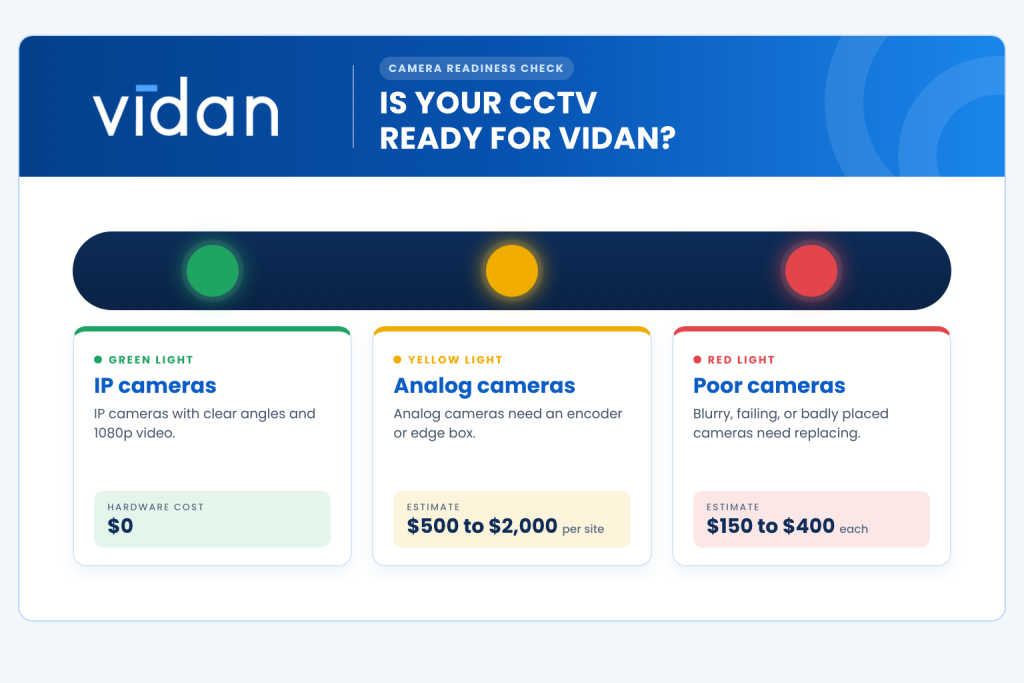
Usually yes. Camera-agnostic platforms connect to any IP camera supporting RTSP or ONVIF. Most AI video analytics for restaurant rollouts begin by testing the cameras you own. Quality AI video monitoring software for restaurants reads those standard streams directly.
A Five-Minute Camera Readiness Test
- Confirm each camera is IP-based and supports ONVIF or RTSP.
- Check resolution. Faces and hands need clear detail.
- Review angles at the register, back door, and kitchen pass.
- Watch night footage for glare or dark corners.
- Test your upload speed during dinner rush.
Unsure what an upgrade buys? Read Restaurant Video Surveillance vs Traditional CCTV: What’s the Difference? first.
Is AI Video Analytics Worth the Cost for Restaurants?
Yes, when software costs less than the losses it helps stop. Two numbers frame the risk.
- NRA estimates tie about 75% of restaurant losses to employee theft. (QSR Magazine) qsrmagazine
- NRA estimates also put restaurant theft near 4% of restaurant costs. (Hospitality Net) hospitalitynet
The Break-Even Formula
Annual software spend ÷ annual losses = share you must recover.
Ten cameras at $30 each cost $3,600 a year. Say theft and waste total $12,000. You must recover 30% to break even. Use your own numbers.
Where the Savings Come From
At Vidan AI, we advise starting with two or three high-loss zones. Cash handling, back doors, and drive-thrus come first. The cost of AI-powered video surveillance stays low that way.
Alerts also catch safety lapses and service delays. POS reports alone miss plenty, as Why Restaurant Loss Prevention Needs More Than POS Reports explains.
Use AI video analytics for restaurant budgets to target those loss zones first. Expand only after the first alerts prove their value.
A Simple Restaurant Cost Planning Framework
Before buying a system, divide the requirements into three categories.
Stage 1
Essential monitoring
- Entrance and exit activity.
- Cash register coverage.
- Kitchen visibility.
- Existing camera compatibility.
Stage 2
Operational analytics
- Queue monitoring.
- Customer traffic patterns.
- Restricted area detection.
- Real-time event alerts.
Stage 3
Multi-location reporting
- Centralized dashboards.
- Location comparisons.
- Custom reporting.
- Advanced integrations.
This framework helps prevent unnecessary spending. Restaurants can start with their most pressing monitoring requirements and expand later.
Where Vidan AI Fits Your Budget
Vidan AI keeps spend focused on what hurts margins. It is AI CCTV software for restaurants and QSRs that adds event detection to compatible CCTV.
Works with: Compatible cameras you already own
Detects: Suspicious activity, safety lapses, and service delays
Alerts: Real-time so that staff can act fast
Coverage: Restaurants, QSRs, and food and beverage sites
Multi-location: One view across every restaurant
Support: One team for rollout, tuning, and ongoing help
Pricing: A specialist maps the setup to your risks, budget, and timeline
Owners avoid paying for cameras they do not need. They also avoid reviewing hours of footage by hand. Your team sees the moments that matter.
🔔 Real-Time Restaurant Alerts
Hear About Problems Before Closing Time
Vidan AI notifies your team when something looks wrong, so you can act while it matters.
What Can Restaurants Monitor With Vidan AI?
| Monitoring Area | What Vidan AI Helps Identify |
| Restaurant entrances | Customer movement and unusual activity |
| Dining areas | Customer traffic and congestion |
| Kitchens | Defined safety and operational violations |
| Cash registers | Suspicious or unusual activity |
| Restricted zones | Unauthorized entries |
| QSR counters | Queue activity and service bottlenecks |
The actual detection capabilities depend on camera views, configuration, and the selected monitoring requirements.
Why Consider Vidan AI?
- Existing camera infrastructure
Vidan AI can work with compatible existing CCTV systems. Restaurants can assess their current cameras before considering replacement.
- Real-time event monitoring
The platform identifies configured events and sends alerts. Managers can investigate without manually reviewing hours of footage.
- Restaurant-focused applications
Vidan AI supports monitoring scenarios across restaurant security and QSR operations. These include customer flow, kitchen activity, and pickup areas.
- Broader operational visibility
Restaurant groups can explore video analytics across multiple operational areas. The goal is to give managers useful information from existing camera feeds.
Explore Vidan AI’s restaurant video surveillance system and QSR video surveillance solutions to understand the available applications.
Questions to Ask Every Vendor Before You Sign
- Does the quote list every one-time and monthly charge?
- Which cameras are compatible, and which need hardware?
- Is pricing per camera or per location?
- How many days of video does the price include?
- What happens to the rate when I add a location?
- Who tunes alerts after launch?
- Can I leave if results fall short?
In Conclusion
Price the ladder one rung at a time. Start with software on cameras you own. Add hardware and monitoring only where risk demands it. AI video analytics for restaurant budgets stay healthy when every dollar maps to a loss zone.
Your margin is too thin for guesswork. Vidan AI turns your cameras, sites, and goals into a clear quote.
Ready to price your restaurant? Talk to Vidan AI today.