
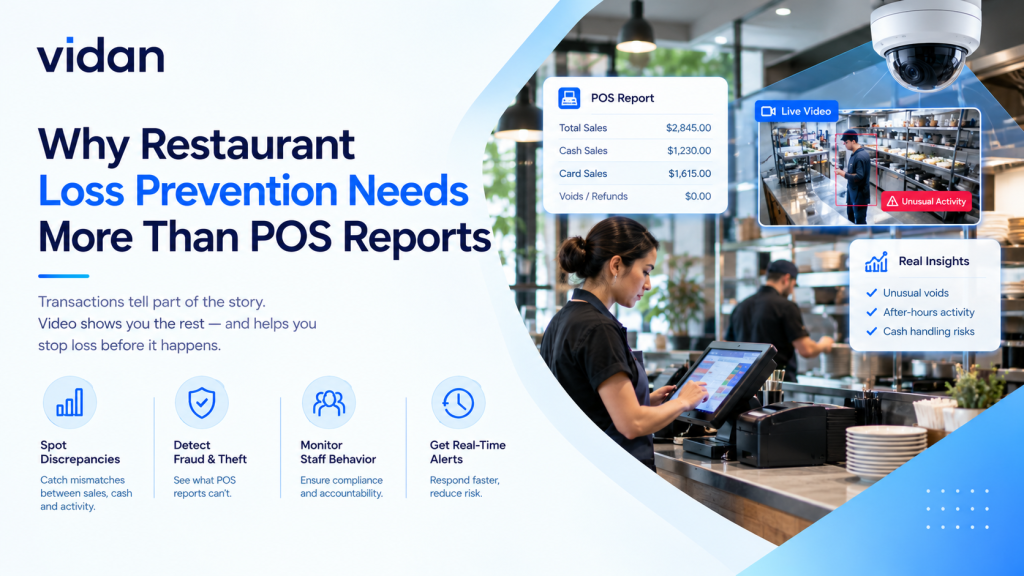
Your POS report is accurate. It is also blind. Strong restaurant loss prevention needs video evidence besides transaction data, because most losses never reach the register.
Short answer: A POS report logs what staff entered. Video shows what actually happened. Pairing the two exposes voids, comps, walkouts, and order errors that data alone hides.
Most operators already own the cameras. They rarely have the habit of checking them. That gap is where margin leaks.
Key Takeaways
- POS reports show entries, not behavior.
- Employee theft accounts for about 75% of restaurant inventory shortages, per the National Restaurant Association.
- Walkouts, comps, and drive-thru errors leave weak data trails.
- Video matched to transactions turns suspicion into proof.
- AI watches every camera, so managers review exceptions only.
What Does Restaurant Loss Prevention Cover Beyond POS Reports?
Loss prevention for restaurants is the set of controls that protect cash, food, and time. It covers theft, fraud, waste, and process errors. POS data is only one input.
| Signal | What the POS report shows | What Video Adds |
| Void | Item removed, time, employee ID | Whether the food was served first |
| Comp | Discount code and amount | Who actually received the item |
| Cash sale | Amount rung | Whether cash reached the drawer |
| Walkout | An open, unpaid check | Who left, when, and through which door |
| Drive-thru order | Order total | Window handoff and bag contents |
Where Do POS Reports Go Blind?
POS systems record entries. They cannot judge intent. That makes them weak witnesses.
Voids That Look Routine
A void is normal. A void after a cash payment is not. The report lists both the same way.
Comps With No Recipient
Discount codes show value. They never show who ate the food. Sweethearting hides inside that gap.
Theft Is Common, Not Rare
The National Restaurant Association estimates employee theft accounts for about 75% of inventory shortages and 4% of sales, according to EY. That same report cites Washington University research showing 56% of servers committed identifiable theft at least once.
Relying on POS data alone turns restaurant loss prevention into a paperwork exercise. Paperwork cannot see behavior.
Your POS Rang It Up. Did Anyone See It?
Voids, comps, and cash sales look clean on paper. Vidan AI watches the floor and flags what the report cannot show.
Which Losses Hide Behind a Clean POS Report?
Losses arrive in three forms. Each one needs a different check.
Cash Losses
- Sales taken before they are rung in
- Voids entered after cash payment
- Fake refunds sent to personal cards
Inventory Losses
- Free food and drinks given to friends
- Overportioning on the line
- Missing stock at receiving
How Does a Walkout Unfold, and Where Can You Stop It?
Good dine-and-dash prevention works on timing, not confrontation. Walkouts follow a pattern. Each stage offers a chance to act.
- Arrival: Cameras log party size, table, and entry time.
- Ordering: The POS opens a check that video can later match.
- Check request: Guests who gather belongings without asking for the bill deserve a look.
- Exit: A party leaving by a side door with an open check is a clear signal.
- Review: Staff pull the clip, confirm the table, and document the loss.
What Can Video Prove That a Receipt Cannot?
Can video confirm a void was legitimate?
Yes. A clip shows whether the dish was remade, returned, or served.
Can video settle a guest dispute?
Yes. Footage shows what was handed over and when.
Can video catch unrung sales?
Yes. A drink handed over with no matching ticket stands out fast.
Can video connect a person to a pattern?
Yes. Repeat events on the same shift point to a habit, not an accident.
Restaurant POS-video integration links each transaction to its camera clip. Managers stop guessing and start verifying. Better restaurant loss prevention begins with that link.
Traditional systems only record events. Our guide on restaurant video surveillance vs. traditional CCTV explains why recording alone falls short.
Which Restaurant Formats Face Which Risks?
Full Service Dining
Top risk: Walkouts, comps, and bar giveaways.
Camera focus: Bar, entrances, and patio exits.
Quick win: Review every open check at close.
Quick Service and Drive-Thru
Top risk: Order errors and window cash handling.
Camera focus: Lane, window, and registers.
Quick win: Spot check bags before cars leave.
Cafes and Fast Casual
Top risk: Unrung sales and sweethearting.
Camera focus: Counter and register.
Quick win: Match peak hour tickets to clips.
Multi Location Groups
Top risk: Uneven standards between sites.
Camera focus: The same angles at every location.
Quick win: Compare exception rates by site.
Why Does the Drive-Thru Need Its Own Rulebook?
87%
Average drive-thru order accuracy across 13 brands, per Intouch Insight’s 2025 Drive-Thru Study.
That leaves about 13 of every 100 orders wrong. Lanes get messy fast. Cars stack, orders change, and bags move quickly.
Drive-thru analytics measures queue length, dwell time, and handoff accuracy from camera feeds.
- Queue length shows when lanes back up.
- Window dwell time reveals slow handoffs.
- Bag checks expose order errors before the car leaves.
- Cash handling at the window gets a visible record.
Speed matters too. An earlier Intouch Insight study estimated a five-second gain can add over $8,000 in yearly sales per unit when lanes stay busy, as Restaurant Dive reported.
Every Second at the Window Is Money
Track queues, handoffs, and cash handling across locations. Vidan AI turns lane footage into clear signals for managers.
Which Four Checks Close the Gap?
We use a simple framework with operators. It is called Ledger, Lens, Lane, Loop.
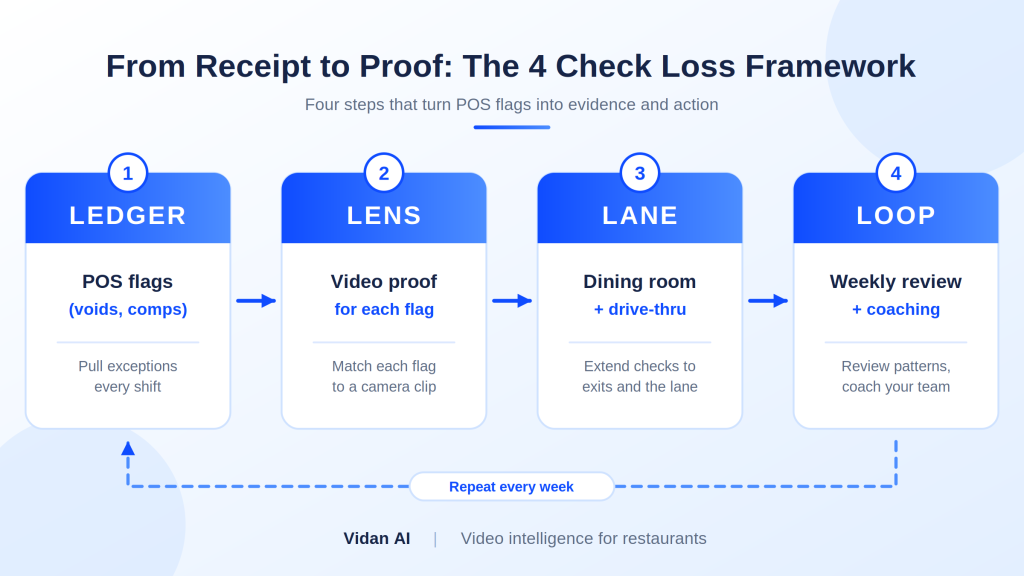
- Ledger: Pull POS exceptions every shift.
- Lens: Match each exception to a camera clip.
- Lane: Extend checks to the drive-thru and exits.
- Loop: Review patterns weekly and coach staff.
Who Gets What From Video AI?
Owner or Operator
Needs: Fewer unexplained losses.
Gets: Evidence behind every flagged event.
General Manager
Needs: A fast way to check problem shifts.
Gets: A short alert list instead of hours of footage.
Regional Director
Needs: Consistent standards across sites.
Gets: One view of events from multiple locations.
IT or Operations Lead
Needs: Minimal disruption to current systems.
Gets: Analysis added to existing cameras.
What Does Vidan AI Add to the Cameras You Already Own?
- Live analysis: We add AI to existing cameras, so footage becomes alerts.
- Fewer screens to watch: Your team sees flagged events, not endless feeds.
- Fast review: Recorded events are searchable, so clips take minutes to find.
- Multiple locations: Operators manage security across sites from one view.
- Match to POS: Flagged events give managers a short list to compare against POS exceptions.
Our breakdown of AI restaurant security in 2026 shows how this works across locations.
Why Does “AI Watches, Humans Decide” Work Best?
What AI does best
- Watches every camera at once.
- Never gets tired at 2 AM.
- Flags unusual patterns quickly.
- Keeps a searchable record.
What managers do best
- Judge context and intent.
- Talk to staff with fairness.
- Decide on coaching or escalation.
- Protect team culture.
Where the Handoff Happens
Vidan AI flags the event. A trained manager reviews the clip. A person always makes the decision. AI does not accuse anyone. It surfaces evidence. People weigh it fairly.
How Do You Start in 30 Days?
- Week 1: List your top five POS exceptions by dollar value.
- Week 2: Review camera angles at registers, exits, and the window.
- Week 3: Match every flagged exception to a clip.
- Week 4: Hold a team review and set one coaching goal per issue.
How Do You Keep Alerts Useful Instead of Noisy?
Do
- Start with three to five alert types.
- Assign one owner per alert.
- Review false flags every week.
- Retire alerts nobody acts on.
Do Not
- Switch on every detection at once.
- Send every alert to every manager.
- Ignore repeat flags from one zone.
- Skip the weekly tuning review.
The Rule of Three
If an alert does not lead to action within a month, rework it. Useful alerts earn their place.
How Does Vidan AI Support Chains, QSR Brands, and Food Producers?
Quick Service Brands
Lanes, windows, and registers share one theme: speed with accuracy. Vidan AI gives managers a view of queues and handoffs across locations.
Full Service Groups
Dining rooms, bars, and patios need different angles. Vidan AI helps teams compare exception patterns between sites.
Food and Beverage Production
Compliance matters as much as theft. Vidan AI can monitor PPE and hygiene on production floors. It also helps create timestamped records for QA teams.
Mixed Operations
Some groups run kitchens, retail counters, and delivery hubs. One platform keeps standards consistent across all of them.
Stop Auditing the Aftermath
Receipts record the sale. Cameras record the truth. Put them side by side, and every loss gets a time, a face, and a fix. Strong restaurant loss prevention is not about more reports. It is about better evidence. Vidan AI turns your existing cameras into a team that never blinks.
Book a walkthrough with Vidan AI and see what your POS report has been missing.