
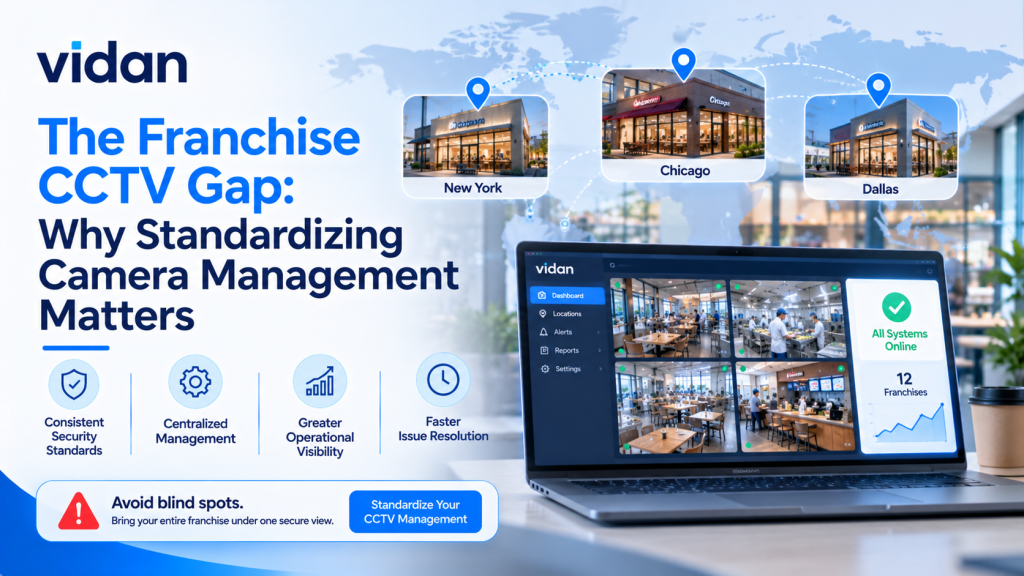
Your brand standards cover fry times, uniforms, and logo placement. Camera standards usually do not exist. That is the franchise CCTV gap. Strong managed CCTV services for QSR programs close it. Every store gets the same camera baseline, access rules, retention policy, and support team. One dashboard shows every site. One partner fixes what breaks.
Without a standard, each store becomes a separate experiment. Footage sits on aging recorders. Nobody knows who holds the logins. Incidents wait days for review.
Quick answer: Standardize cameras, access rules, retention windows, and review routines across all locations. Then assign daily upkeep to one managed team.
Key Takeaways
- The gap is inconsistency, not a lack of cameras.
- One baseline for hardware, access, storage, and review fixes most failures.
- Budget about $2,500 to $10,000 per store for hardware and installation (estimate).
- Cloud management often adds $10 to $40 per camera each month (estimate).
- AI analytics can turn existing cameras into alert systems.
- Pilot first, then roll out in waves.
Why QSR Franchises Need Standardized Security Camera Systems
Mixed systems create blind spots, slow investigations, and uneven evidence. One standard gives every store the same visibility.
What Does The Franchise CCTV Gap Look Like?
Franchise CCTV management is the practice of running every location’s cameras under one standard, one owner, and one policy.
The gap shows up in three ways:
-
- Store A runs 4K cameras with 60 days of storage. Store B runs analog cameras with seven days of storage.
- Store C’s main login belongs to a manager who left last year.
- Headquarters cannot pull a clip without calling the store.
Store A Keeps 60 Days. Store B Keeps 7. Which One Has Your Clip?
Uneven retention is one symptom of the franchise camera gap. Here is how QSR brands approach a shared standard.
How Large Is The Exposure?
The International Franchise Association projects 845,000 U.S. franchise establishments in 2026. QSR Magazine reports roughly 281,000 of those are quick service units.
The National Restaurant Association estimates employee theft causes 75 percent of inventory shortages. That equals about 4 percent of sales, per Fast Casual. Margins are thin, so evidence matters. Video only helps when someone can find the right clip fast.
Challenges Of Managing Security Cameras Across Multiple Restaurants
Six problems repeat in almost every franchise system.
| Challenge | What it looks like | Business cost |
| Mixed hardware | Different brands, ages, and resolutions | Uneven evidence quality |
| Shared logins | One password passed between managers | No accountability |
| Uknown retention | Footage overwritten in days | Lost evidence |
| No maintenance owner | Dead cameras go unnoticed | Silent blind spots |
| Slow footage requests | Store staff export clips by hand | Delayed claims and disputes |
| No cross-store view | Each site reviewed alone | Patterns stay hidden |
Solving one problem rarely helps. Strong multi-location CCTV management has to fix all six together.
Which Problem Does The Quietest Damage?
Weak camera access permissions hurt most. Former staff keep logins. Managers share passwords. Nobody can prove who viewed or exported a clip.
What Do Managed CCTV Services QSR Teams Actually Include?
Managed CCTV is an outsourced operating model. A provider designs, monitors, and maintains your cameras under one contract.
A solid package covers five jobs:
-
- Standardized camera systems. One approved camera list and coverage map for every store.
- Remote camera access. Owners and auditors view any store from one login.
- CCTV system maintenance. Technicians track camera health, replace failures, and update firmware.
- Video footage management. One policy governs retention, search, and export.
- Multi-site security monitoring. Alerts and health reports roll up across all stores.
Restaurant Surveillance
The POS Logged a Void. What Was Happening at the Drawer?
Where Does DIY Break Down?
- Owners lack time to track firmware and camera health.
- Each franchisee negotiates a different vendor.
- Nobody reviews footage until something goes wrong.
Outsourcing moves that burden to people who handle it daily.
How Do You Build A Franchise Camera Baseline?
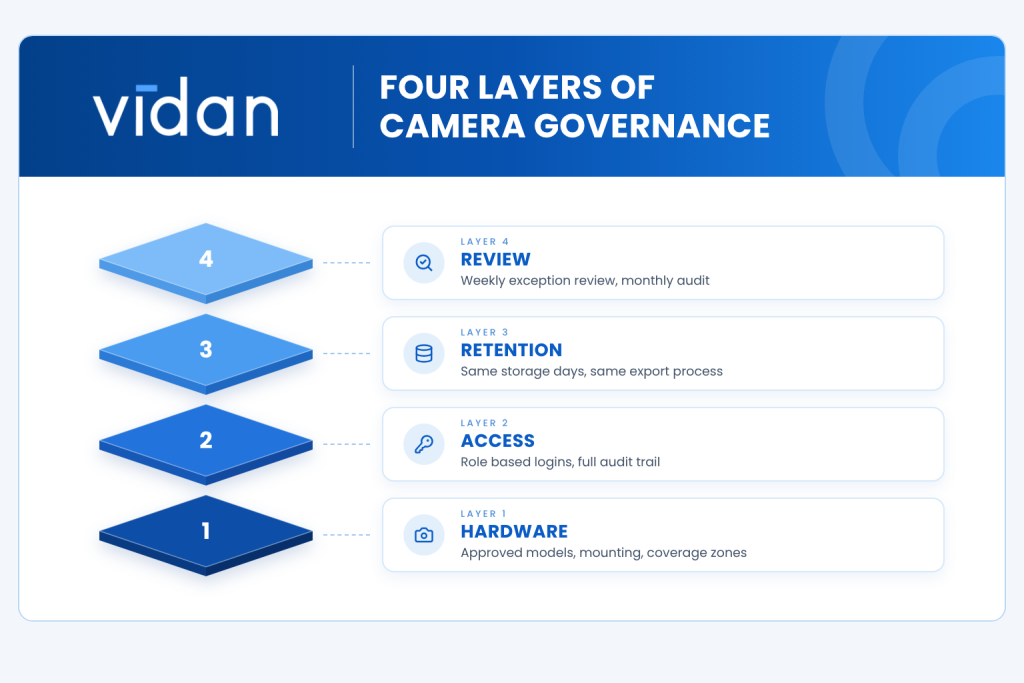
A baseline is the minimum standard every store must meet. Use this four-layer model. Build from the bottom up.
How To Centralize CCTV Management For Restaurant Chains
Pick one platform that connects every recorder and camera brand. Assign one owner at the brand level. Give franchisees view rights, not admin rights. Centralized CCTV management means every store reports to one platform with shared rules and one audit trail.
Remote review is the payoff. Best Remote Video Monitoring Solutions for Restaurants With Multiple Locations shows what operators should expect.
How Franchise Owners Can Standardize Video Surveillance
Split the work by role. The brand writes the baseline. Franchisees fund and host the equipment. A managed partner operates it. That split is why managed CCTV services QSR programs fit franchise systems so well.
Put footage ownership in the franchise agreement. Ask counsel to review privacy and consent rules in each state.
How Much Does a QSR Camera Standard Cost?
Costs vary by camera count, building, and retention. These ranges are estimates built from published vendor and operator data.
| Cost Item | Estimated Range (USD) |
| IP dome or turret camera | $100 to $600 each |
| Analog camera | $40 to $180 each |
| Hardware plus install, 8 to 16 cameras | $2,500 to $10,000 per store |
| Network video recorder | About $1,500 per site |
| Cloud management and retention | $10 to $40 per camera each month |
| AI analytics layer | Quoted per camera or per site |
What Does A 50-Store Rollout Look Like?
Take 50 stores with 12 cameras each. That is 600 cameras.
Hardware and installation would run about $150,000 to $500,000. Management fees at $10 to $40 per camera would add $6,000 to $24,000 monthly. These are planning estimates, not quotes. QSR video surveillance management should be one line item, not 50 vendor bills.
When you compare bids for managed CCTV services for QSR programs, ask for one number first. Request the fully loaded monthly cost per location, as Savi advises.
How To Manage CCTV Systems Across Multiple Franchise Locations
Typical timeline (estimate):
- Audit every store (weeks 1 to 2). List cameras, recorders, logins, and retention days.
- Write the baseline (week 3). Approve models, coverage zones, and roles.
- Pilot at three to five stores (weeks 4 to 8). Test alerts, exports, and support.
- Migrate in waves (months 3 to 6). Move ten to twenty stores at a time.
- Review monthly. Track camera uptime, clip request time, and open incidents.
Good restaurant chain security management treats rollout like a menu launch. Test small, document, then scale.
The same footage can support procedure checks. Franchise Multi-Location Compliance Audits Without Constant On-Site Inspections explains how.
Where Should Cameras Go In A Quick Service Restaurant?
Cover the zones where money, food, and people move. Use this list as your site survey checklist.
Front Of House
- Entrance and exit doors
- Counter and register area
- Dining room and self-order kiosks
Back Of House
- Kitchen line and prep area
- Walk-in cooler and storage
- Cash office and safe
- Rear door and delivery entrance
Exterior
- Drive-thru order point and pickup window
- Parking lot and dumpster area
Set one rule for every zone. A face or hands must be identifiable at the register. A plate or vehicle must be readable at the window.
How Do You Keep Store Cameras Secure And Compliant?
A camera network is also an attack surface. Treat it like a payment system.
Who Can See What?
Give each role the least access it needs. Owners view their own stores. Auditors view every store, read-only. Only the brand administrator changes settings.
What Should The Audit Trail Record?
- Every login and failed login
- Every clip viewed, exported, or shared
- Every settings change and who made it
Remove access the day an employee leaves. Rotate default passwords at install.
What About Privacy And Signage?
Rules differ by state. Audio recording carries stricter consent rules than video. Post clear camera notices at entrances. Keep cameras out of restrooms and changing areas. Ask counsel to confirm local requirements before rollout.
Which Metrics Prove Your Camera Standard Is Working?
Track five numbers monthly. Targets below are starting points to adjust per brand.
| Metric | Starting Target | Why It Matters |
| Camera uptime | 98% or higher | Dead cameras are blind spots |
| Time to retrieve a clip | Under 15 minutes | Speeds claims and disputes |
| Stores meeting the baseline | 100% after migration | Proves the standard holds |
| Active logins per store | Matches current staff | Flags stale accounts |
| Open camera faults older than 7 days | Zero | Shows maintenance is working |
Review the scorecard with franchisees each month. Publish store rankings internally. Visibility drives compliance.
What Changes When An Incident Hits A Standardized Store?
These are illustrative scenarios, not customer results. Each compares an unstandardized store with a standardized one.
A Disputed Refund At The Counter
Before: The manager searches a local recorder by hand. The clock is off by nine minutes. The clip is never found.
After: Headquarters searches by time and register. Synced clocks match the POS record. The clip arrives in minutes.
A Drive-Thru Vehicle Claim
Before: The window camera is low resolution. The plate is unreadable. The claim is paid.
After: The baseline requires a plate-capable camera at the pickup window. The clip settles the claim.
A Cash Shortage At Closing
Before: Three managers share one login. Nobody knows who exported what.
After: Role-based logins and an audit trail show who viewed footage. The review starts with facts.
What Mistakes Derail A Camera Standardization Rollout?
Most failures come from process, not technology.
Buying Hardware Before Writing The Baseline
A purchase order locks in choices. Write the baseline first. Then buy to match it.
Skipping The Franchisee Conversation
Owners pay for equipment and host it. Explain the benefit in claims, losses, and time saved. Mandates without reasons get ignored.
Ignoring Network Capacity
Video is bandwidth-heavy. Test each store’s connection during the pilot. Plan for uploads outside peak hours.
Treating Installation As The Finish Line
Cameras drift, fail, and get bumped. Without monthly reviews, a standard decays within a year.
Where Does Vidan AI Fit in a Standardized Setup?
Vidan AI is a video analytics platform. It adds AI event detection to compatible CCTV systems. You keep your cameras.
At a glance
- Built for: QSR chains, restaurants, and franchise operators
- Works with: compatible existing CCTV cameras
- Detects: specific events, not just motion
- Alerts: real-time notifications to the right manager
- Evidence: timestamped clips for review and audits
Standard cameras record. Vidan AI tells your team when to look. Managers review relevant clips instead of hours of footage.
See how AI Restaurant Security in 2026 is changing surveillance.
In Conclusion
Every nonstandard store is a future dispute with no footage.
Pick a baseline. Pilot it. Scale it. The right managed CCTV services QSR partner makes that plan run without adding work for owners.
Vidan AI adds the intelligence layer. Your cameras stop only recording and start alerting. Ready to close your franchise CCTV gap? Talk to the Vidan AI team and map your first pilot.