
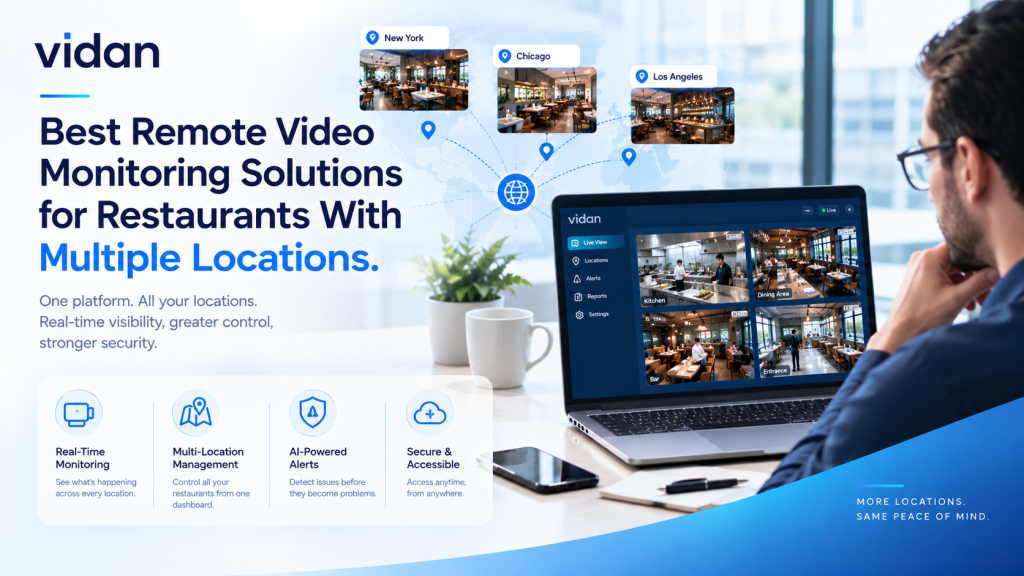
Seven locations. Seven recorders. Zero shared view.
The best remote video monitoring solutions for restaurants close that gap. They pull every site onto one screen. They flag trouble as it starts. Managers stop reviewing footage after the loss and act while the event is still unfolding.
This guide shows what to look for, how the main options compare, and where AI changes the math for chains.
Quick answer: The strongest setup combines cloud video access, AI event detection, and a clear alert workflow. It works with the cameras you already own. One team sees every site, verifies incidents in seconds, and reviews clips without driving to the store.
Key Takeaways
- One shared dashboard beats a separate recorder at every site.
- Alerts matter more than storage. Hours of footage help no one.
- Check camera compatibility before you buy any hardware.
- AI filters noise so managers only see real events.
- Match the solution to your biggest risk first.
- Test any vendor at one pilot site before a full rollout.
What Is Remote Video Monitoring for Restaurants?
A remote video monitoring solution lets a team watch, search, and respond to camera events from anywhere. For restaurants, it replaces site-by-site checks with one shared view.
Three types lead the market.
Cloud Video Platforms
Cloud platforms store footage online and give managers browser access. This is centralized video surveillance for restaurants in its simplest form. Operators log in once and open any site.
The gap is simple. Most cloud platforms still need a person watching the screen.
Remote Guard Services
Some providers staff live operators who watch feeds and call for help. That is remote CCTV monitoring for restaurants with a human response layer. It suits high-risk sites.
Costs climb fast across many stores. Our guide on what determines remote video monitoring costs explains the price drivers.
AI Analytics Layers
AI watches every camera all the time. It flags events like after-hours entry, cash area activity, or crowding. People only review what the AI surfaces.
AI-powered video analytics sits on top of cameras you already have. No new cameras are required.
Why Do Restaurants With Multiple Locations Need Remote Monitoring?
The numbers explain the urgency.
75%
Share of restaurant inventory shortages tied to employee theft, per the National Restaurant Association. Source: EY, Loss Prevention Services for Restaurants
4%
Share of restaurant sales lost to employee theft, per the National Restaurant Association. Source: FastCasual
56%
Share of servers who committed identifiable theft at least once, per Washington University research. Source: EY, Loss Prevention Services for Restaurants
Where Single-Site Habits Break
A general manager can watch one store. No one can watch twelve. Footage sits on local recorders. Nobody opens it until something goes missing. Multi-location restaurant security breaks down when every site follows different habits.
What Remote Visibility Fixes
Remote restaurant security monitoring gives regional managers one view. They compare sites, spot patterns, and step in early.
Patterns only show up across multiple restaurant locations. A void spike at one store looks odd next to eleven normal ones.
Which Restaurant Formats Need Remote Monitoring Most?
Every format has a different weak spot. Match the first alert to the format.
Quick Service and Drive-Thru
- Top risk: Cash handling during rush hours.
- Best first alert: Register events outside normal patterns.
- Why it works: Short shifts and high volume leave little time for manual checks.
Fast Casual and Full Service
- Top risk: Voids, comps, and staff door traffic.
- Best first alert: Entry through staff doors outside shift hours.
- Why it works: Larger floors hide activity from a single manager.
Ghost Kitchens and Delivery Hubs
- Top risk: Pickup handoffs and unattended entries.
- Best first alert: Long waits in the pickup area.
- Why it works: Few staff and many couriers create gaps.
A Recorder at Every Store or One View of All of Them?
Review after the loss
One site at a time
Clips sent to the right person
Every location on one screen
Which Features Should You Check Before You Buy?
The best remote video monitoring solutions for restaurants share six traits. Score every vendor against this list.
Must-Have Features
- Insist on existing CCTV integration before any hardware quote.
- One dashboard that opens every site.
- Real-time security alerts with a video clip attached.
- Event search by time, zone, and event type.
- Role-based access for managers, regional leads, and owners.
- Local processing for sites with weak internet.
Red Flags in a Demo
- The vendor requires replacing all cameras.
- Pricing per camera stays vague.
- Alerts arrive without video.
- No pilot option exists.
How Do the Main Solution Types Compare?
No option wins everywhere. The best remote video monitoring solutions for restaurants depend on your risk profile.
| Option | Best for | Main gap | Cost pattern |
| DVR or NVR with remote app | Single stores, basic playback | No cross-site view, no alerts | Low upfront |
| Cloud video platform | Shared access and storage | Humans must watch the screens | Subscription per camera |
| Live guard monitoring | High-risk sites, night coverage | Expensive across many stores | Ongoing per site |
| AI video analytics platform | Chains needing alerts and search | Needs tuning in early weeks | Subscription per site |
Our comparison of restaurant video surveillance vs. traditional CCTV covers the camera side in more detail.
What Is the One-Screen Framework for Choosing a Solution?
Use this four-stage flow to test any vendor.
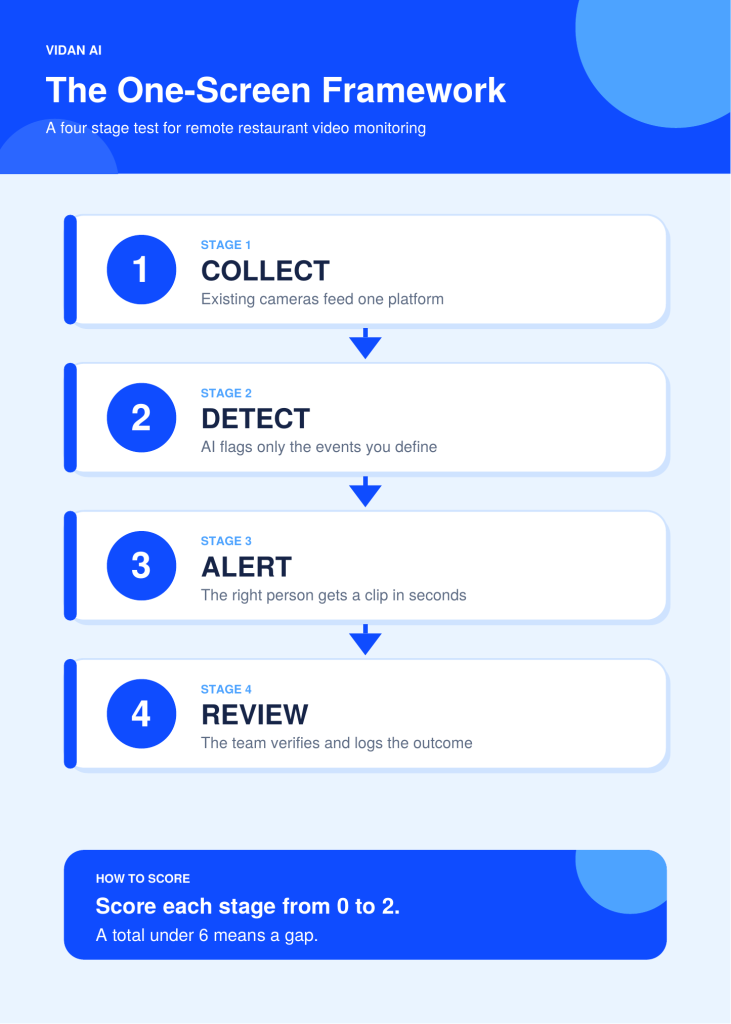
Weak plans usually break at Stage 3. Detection is easy. Routing is hard. An alert sent to the wrong person gets ignored.
How Do You Roll Out Monitoring Across Many Sites?
Use three phases. Each phase has one goal and one exit test.
Before Phase 1
- List the cameras at every site.
- Check internet speed at each location.
- Name an owner for every alert type.
- Prepare a privacy notice for staff and guests.
Phase 1: Pilot
Goal: Prove alerts work at one site.
Actions: Connect cameras. Define two or three events. Assign alert owners.
Exit test: Managers trust the alerts and act on them.
Phase 2: Tune
Goal: Cut noise.
Actions: Review false alerts weekly. Adjust zones and schedules.
Exit test: Alerts feel useful, not constant.
Phase 3: Scale
Goal: Repeat the setup everywhere.
Actions: Copy settings to similar sites. Train regional leads.
Exit test: A new site goes live with no custom work.
What If Your Sites Have Weak Internet?
Weak connections are common in older buildings. Three fixes keep monitoring reliable.
Process video at the edge. A small device at each site analyzes video locally. Only events and clips travel to the cloud. This cuts bandwidth use sharply.
Send clips, not streams. Constant streaming strains small connections. Short event clips need far less bandwidth.
Plan a backup connection. A second line keeps alerts moving during outages. Local storage keeps recording either way.
How Does Vidan AI Support Restaurants Across Many Sites?
Vidan AI helps restaurant operators monitor multiple locations through AI-powered video analytics that work with existing CCTV cameras. Instead of relying only on staff to watch live feeds or review footage after an incident, restaurants can receive alerts about specific activities and review relevant events remotely.
For restaurant chains, this can support several security and operational needs:
- Centralized video monitoring: Check activity across multiple restaurant locations without switching between disconnected monitoring processes.
- Real-time security alerts: Receive notifications when configured detection rules identify activity that needs attention.
- Theft and loss prevention: Review suspicious activity around entrances, cash handling areas, storage rooms, and other sensitive zones.
- After-hours monitoring: Keep track of activity when restaurants are closed, including movement in restricted areas.
- Existing CCTV integration: Add AI video analytics to compatible camera systems without necessarily replacing the installed hardware.
- Operational visibility: Monitor activity around queues, customer areas, and other restaurant zones to identify issues that may need staff attention.
For restaurant groups managing several sites, Vidan AI offers a way to add AI-powered monitoring to existing surveillance infrastructure. Teams can spend less time searching through footage and focus on reviewing relevant alerts across their locations.
Know What Happened at Every Location Before You Walk In
Regional leads start the day with flagged events from all sites. Vidan AI keeps the record.
3 flagged events
1 clip needs review
0 open issues
How Do You Know Remote Monitoring Is Working?
Track five numbers for the first 30 days.
Metrics to Track
- Alert-to-action time: Minutes from alert to first response.
- False alert rate: Share of alerts that needed no action.
- Incidents caught early: Events stopped before any loss.
- Shrink trend: Pilot site compared with a similar site.
- Manager hours saved: Time no longer spent scrubbing footage.
How to Compare Fairly
Pick a control site with similar sales volume. Compare the same weeks. Keep other changes to a minimum.
When to Expand
Expand when false alerts fall and response times shrink. Pause if managers start ignoring alerts.
What Mistakes Make Remote Monitoring Fail?
Myth: More cameras mean more security.
Fact: More cameras mean more footage. Detection and alerts create the security.
Myth: Every alert should reach everyone.
Fact: Alert fatigue is real. Route each event type to one owner.
Myth: A full rollout proves the value fastest.
Fact: A pilot site proves it faster and costs less to fix.
Myth: Guards and AI compete.
Fact: AI handles the watching. People handle the response. A remote video surveillance system works best when both roles are clear.
Final Thoughts
The best remote video monitoring solutions for restaurants win on speed. They show what happened. Then they tell the right person right away. Pick your highest-loss location. Choose one risk and one alert path. Run it for 30 days. Measure what changed, then roll out to the rest.
Your cameras are already recording. Make them talk.
Vidan AI turns the cameras you own into a team that never looks away. Book a walkthrough with our team and see your own sites on one screen.