
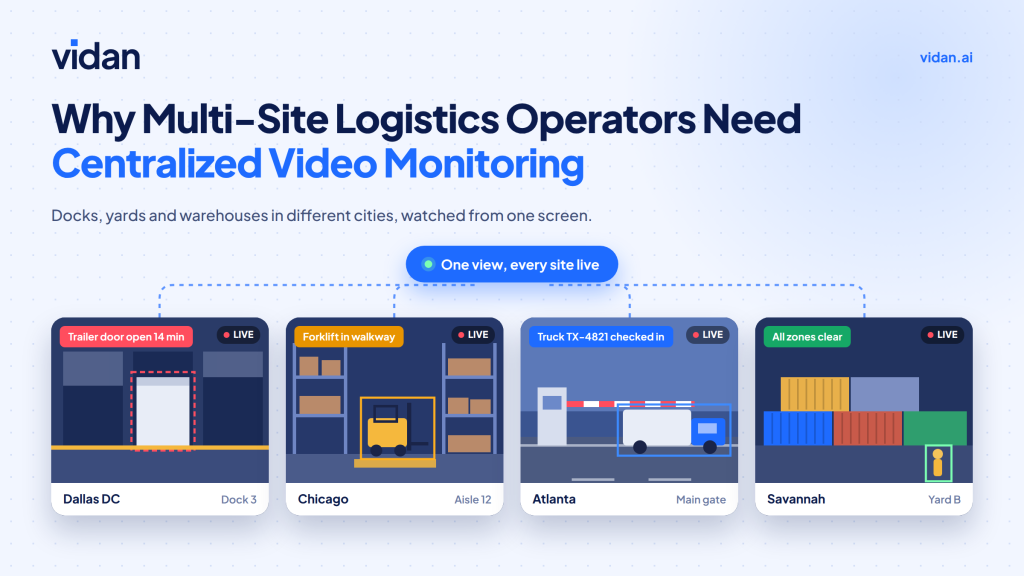
Five sites. Five camera systems. Zero shared view.
That gap is where logistics real-time video surveillance breaks down for multi-site operators. Each yard, dock, and warehouse records on its own. Nobody sees the full network until something goes missing.
This guide covers what to centralize, what to alert on, and how to roll it out on the cameras you already own.
Quick answer
Multi-site logistics operators need centralized monitoring because separate camera systems hide risk between locations. One central view lets teams spot theft, safety hazards, and yard problems as they happen. It also keeps response standards the same at every site.
Key Takeaways
- Separate systems create blind spots at the handoffs between gate, yard, dock, and trailer.
- Cargo theft losses reached nearly $725 million in 2025, per Verisk CargoNet.
- Central monitoring works best when AI filters events, so people review alerts instead of feeds.
- Existing compatible cameras can often feed one shared platform.
- Roll out in phases. Start with your highest risk site, then expand.
What Breaks When Every Site Runs Its Own Cameras?
Siloed cameras fail in three predictable ways.
Footage Stays Trapped
Each site stores video locally. An investigation means calling managers, pulling files, and matching timestamps by hand. That delay helps thieves and slows claims.
Standards Drift
One yard flags tailgating. Another ignores it. Alert rules, review habits, and retention periods change with each site manager.
Handoffs Go Unwatched
Most risk sits between zones: gate to yard, yard to dock, dock to trailer. Single-site systems rarely follow freight across those lines. The stakes keep rising. Verisk CargoNet estimated 2025 cargo theft losses near $725 million, up 60% from 2024. The average theft reached $273,990, up 36% (Verisk CargoNet, January 2026).
Fleet and warehouse security both suffer when every location keeps its own records. A logistics yard security checklist helps at each gate. A checklist cannot watch the whole network.
How Does Logistics Real-Time Video Surveillance Work Across Many Sites?
In plain terms, it means analyzing live video from every location and alerting people the moment activity looks wrong. The Four-Layer Network View shows how the pieces fit.
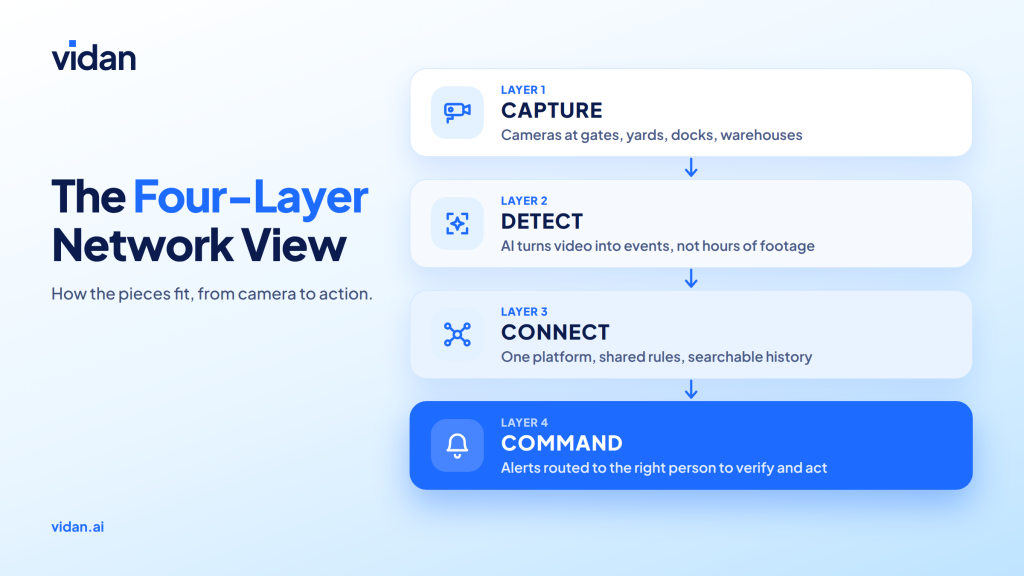
Layer 1: Capture
Use the cameras you already have where possible. Add coverage only at confirmed blind spots.
Layer 2: Detect
AI watches for defined events. Examples include after-hours entry, loitering at a trailer, or a person in a restricted zone.
Layer 3: Connect
This is where centralized video monitoring earns its name. Every site feeds one platform with the same rules and one event history.
Layer 4: Command
People stay in charge. Alerts reach the site lead first, with a central team watching trends.
A well-built logistics real-time video surveillance stack keeps these layers separate. You can upgrade one layer without replacing the rest.
What Should a Central Command View Include?
| Capability | What your team gets | Why it matters |
| Live multi-site grid | Every location on one screen | No more calling site managers |
| Event timeline | Searchable alerts with clips | Investigations take minutes |
| Shared rule library | Same zones and triggers everywhere | Standards stop drifting |
| Alert routing | Right person per site and shift | Faster first response |
| Cross-site reports | Repeat patterns side by side | Fixes target root causes |
Good platforms treat real-time security alerts for warehouses as the core feature. Each alert should carry a clip, a location, and a reason. Strong warehouse video surveillance also records how long each alert took to close. That number shows where response slows down.
Where Does Centralization Pay Off First?
After-Hours Gate Entry
- Situation: A vehicle enters a quiet yard at 2 a.m.
- Central response: The alert reaches the site lead and the central team with a clip attached.
Trailer Swap Mismatch
- Situation: A trailer leaves one site and arrives at another with a different seal.
- Central response: Both sites’ footage sits in one timeline. Teams compare departure and arrival in minutes.
Forklift Near Miss
- Situation: A pedestrian steps into a forklift lane on the dock.
- Central response: AI video analytics for logistics flags the proximity. Supervisors review the clip and fix the lane layout across all sites.
Disputed Delivery
- Situation: A carrier claims freight left the dock intact.
- Central response: Timestamped clips settle the question without a trip to the site.
Should You Centralize or Stay Site by Site?
Centralize when:
- You run three or more locations.
- Incident handling differs by site manager.
- Investigations require calls and file transfers.
- Leadership cannot compare site performance.
Stay local when:
- You operate a single small site.
- One manager already reviews every alert.
- No freight moves between locations.
Multi-site security monitoring also lets leaders compare locations fairly. Repeat problems stop hiding behind site-level averages. The same logic drives supply chain visibility in 2026. Operators now want to know what happens around freight, not only where it is.
Is Your Network Ready? A Quick Self-Assessment
Answer yes or no to each line. Count your yes answers.
- Every site stores video in the same place or platform.
- One person can pull any site’s footage in under ten minutes.
- Alert rules match across all locations.
- Each alert type has a named owner.
- Gate, yard, and dock views connect in one timeline.
- Leadership sees incident trends across sites monthly.
- After-hours activity triggers an alert, not just a recording.
- You review alert response times, not only alert counts.
Your Score
- 0 to 2 yes: High exposure. Start with one pilot site and shared rules.
- 3 to 5 yes: Partial coverage. Fix ownership and cross-site visibility next.
- 6 to 8 yes: Strong foundation. Focus on tuning and expansion.
How Does Vidan AI Bring Every Site Into One View?
What it is: AI video analytics that adds event detection to compatible CCTV.
What it watches: Gates, yards, docks, aisles, and restricted zones.
What it sends: Alerts your team can verify with a clip.
Who decides: Your people. AI watches. Humans decide.
What Teams Use It For
- Theft and intrusion detection around gates and storage areas
- Warehouse safety checks for forklifts, PPE, loading docks, and restricted zones
- Shared visibility across every location
Why It Fits Logistics
Vidan AI works with the cameras you already run, so rollout does not start with new hardware. Our team supports setup, rule tuning, and ongoing improvements.
That matters for logistics facility surveillance, where sites differ in size, layout, and risk. You set rules per zone and keep one view across the network.
What Questions Should You Ask Before Choosing a Platform?
Cameras and Setup
- Does it work with the cameras we already run?
- How long does a pilot site take to connect?
- Can we add sites without re-cabling?
Alerts and Accuracy
- Which events can it detect today?
- How do we tune rules without a vendor ticket?
- Does every alert include a clip and location?
People and Process
- Who handles setup, tuning, and ongoing support?
- Can alerts route by site, shift, and role?
- How does it fit our existing response steps?
Security and Privacy
- Who can view footage, and how is access logged?
- How long is footage retained, and can we change it?
- Where is video processed: at the edge, in the cloud, or both?
How Do You Roll It Out Without Disrupting Operations?
Days 1 to 30: Pick the pilot
Choose the site with the highest loss or incident rate. Map its handoff gaps. Connect existing cameras first.
Real-time video surveillance for logistics should prove itself on one site before it scales.
Add multiple site camera monitoring only after the pilot alerts feel useful.
Days 31 to 60: Tune the rules
Cut noisy alerts until the ones left are worth acting on. Assign an owner to each alert type.
Remote monitoring for logistics operations only works when someone owns every alert.
Days 61 to 90: Expand in waves
Add sites in groups. Compare results across locations. Reuse the rules that worked.
Pick logistics video surveillance systems that add sites without re-cabling.
Budget with remote video monitoring costs in mind. Pricing shifts with site count and live monitoring needs.
Three Mistakes to Skip
- Buying cameras before fixing alerts. More feeds without triage means more noise.
- Alerting on everything. Start with five high-risk events.
- Leaving alerts unowned. Name a responder for each site and shift.
How Do Privacy, Data, and Compliance Fit In?
This is general guidance, not legal advice. Check local rules and your counsel before you deploy.
Access Control
Limit who can view live feeds and recorded clips. Log every access. Review permissions when roles change.
Retention
Set a retention period by site type. Keep incident clips longer than routine footage. Document the policy so every location follows it.
Signage and Policy
Post clear notices where required. Share a short policy with employees and carriers. Transparency lowers friction and disputes.
Edge or Cloud Processing
Edge processing analyzes video near the camera. That can reduce bandwidth use and keep detection running when links are weak. Ask how each option affects your data.
In Conclusion
Separate cameras give you separate stories. One view gives you the full picture. Operators who invest in logistics real-time video surveillance catch problems while they can still act. They spend less time reviewing footage and more time preventing loss.
Vidan AI connects your compatible cameras, adds event detection, and sends alerts your team can verify. Start with one site. Prove it. Then scale.
Ready to see every site in one view? Speak with the Vidan AI team and map your first pilot site.