
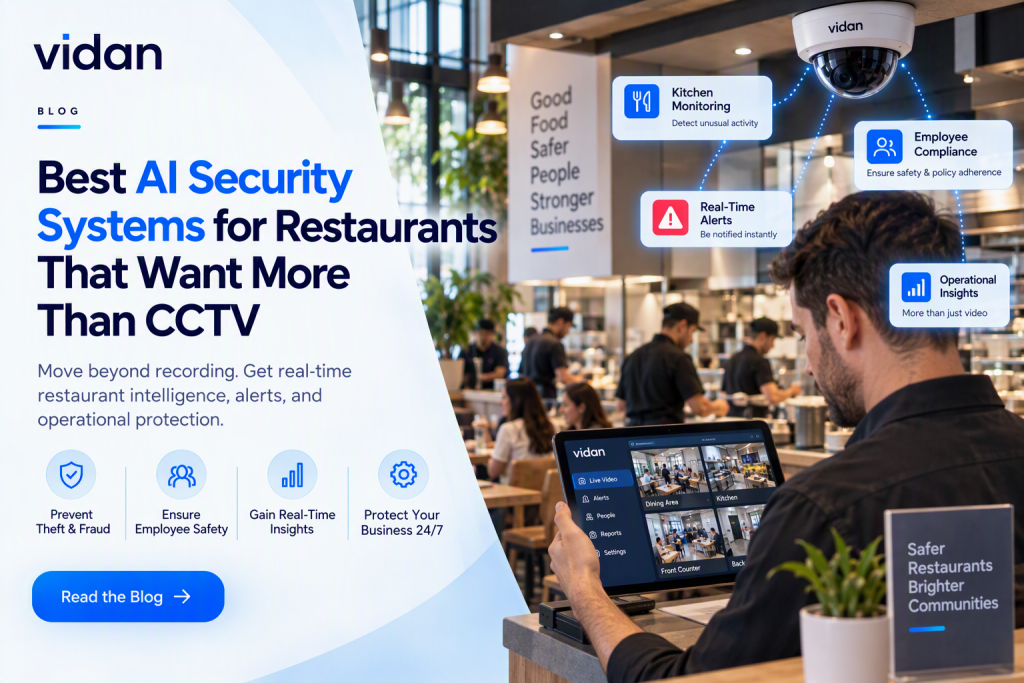
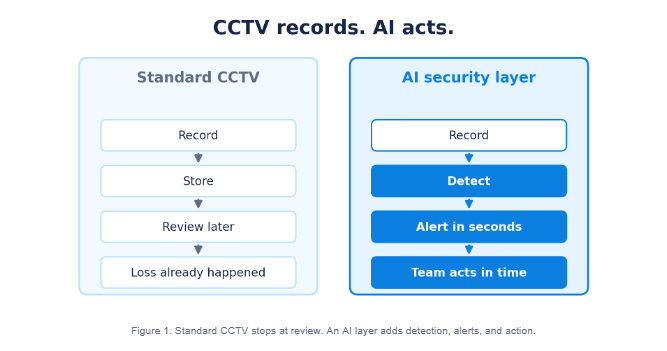
CCTV records the loss. It rarely stops it. The best AI security solutions for restaurants watch every camera live. They flag trouble and alert your team in seconds.
You do not need more footage. You need to know when a door stays propped open, or a stranger lingers near the office. That is what AI adds.
This guide covers what AI detects, how it uses your current cameras, and what to ask vendors.
Key Takeaways
- AI turns passive footage into live alerts your staff can act on.
- Most restaurants can add AI to cameras they already own.
- Thin margins make small leaks expensive.
- Score any system on four rungs: record, detect, alert, act.
- Owners with several sites gain the most from remote monitoring.
- Demand tunable rules and low false alerts from every vendor.
Why Is CCTV Alone Failing Restaurants?
CCTV fails restaurants because it works after the damage is done. It records events but cannot judge them.
Our breakdown of restaurant video surveillance vs. traditional CCTV covers the gap in detail.
Theft hides inside normal shifts
STAT: The NRA estimates employee theft causes roughly 75% of inventory shortages and 4% of sales. (Source: EY, citing the NRA)
That loss rarely looks dramatic. It looks like a void, a free drink, or a side door left open. Strong restaurant loss prevention starts with spotting those small moments as they happen.
Footage arrives too late
Reviewing tape after a loss is slow. Managers rarely have hours to scrub through video. If nobody watches the clip, it protects nothing.
What Are the Best AI Security Solutions for Restaurants?
The best solutions share four traits. They work with your current cameras. They detect restaurant-specific events. They send fast, clear alerts. They help managers act on what they see.
The Buyer Scorecard
| What to check | What good looks like | Red flag |
| Camera support | Works with cameras you own | Demands full camera replacement |
| Detection depth | Flags doors, tills, storage, kitchens | Basic motion alerts only |
| Alert speed | Seconds, with a short clip | Daily summary emails |
| Alert quality | Few false alerts, tunable rules | Constant noise |
| Multi-site view | One dashboard for all locations | Separate logins per site |
| Rollout | Short, guided setup | Months of installation |
Do you need new cameras?
Many owners assume they need AI security cameras for restaurants. Usually they do not. Software can analyze the cameras already on your walls.
What Can AI Actually Detect Inside a Restaurant?
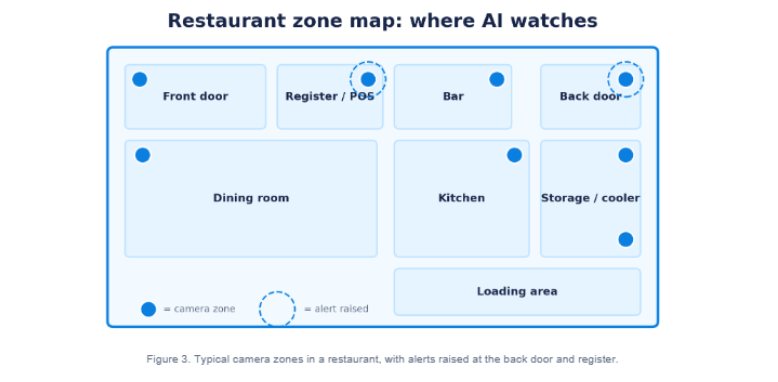
AI works zone by zone. Each area has its own risks. AI video analytics for restaurants gives every camera its own set of rules.
Front Door And Entrances
- Looks for: after-hours entry, tailgating, and crowding.
- Why it matters: it catches break-ins and unwanted access early.
Dining Room And Bar
- Looks for: aggressive behavior, guests leaving unpaid, and lingering near the bar.
- Why it matters: staff can step in before a problem grows.
Register and POS Area
- Looks for: drawer opens without a sale and long dwell time behind the till.
- Why it matters: this is where restaurant theft prevention pays off fastest.
Kitchen And Storage
- Looks for: walk-in cooler access after hours and staff in restricted zones.
- Why it matters: product stops walking out the door.
Back Door And Loading Area
- Looks for: doors propped open, idling vehicles, and loitering.
- Why it matters: a propped door is an open invitation.
Good suspicious activity detection compares behavior against the normal rhythm of each zone.
For the wider industry shift, read AI Restaurant Security in 2026.
Which Threats Matter Most for Each Restaurant Format?
Every format loses money in a different place. Match your rules to your risks.
| Format | Highest risk zones | Smart first rules |
| Quick service | Counters, drive-thru lanes, shift handoffs, back door | Drawer opens without a sale, long dwell at the counter, door open after close |
| Full service | Bar, dining room, cash handling, walk-in cooler | Bar lingering, unpaid exits, cooler access after hours |
| Cafes and bakeries | Front counter, prep area, delivery door | Counter dwell, delivery door left open, restricted prep zones |
| Multi-unit groups | Every site, plus patterns across sites | Same rules everywhere, compared in one dashboard |
Quick service sites
Speed hides mistakes. Fast lines and tight shifts make unrecorded sales easy to miss.
Full service dining
Bars and cash handling carry the most risk. Alcohol, tabs, and walk-in storage all need eyes.
Groups with several sites
Patterns matter more than single events. One site with repeat problems stands out only in a shared view.
What Does a Restaurant AI Alert Look Like?
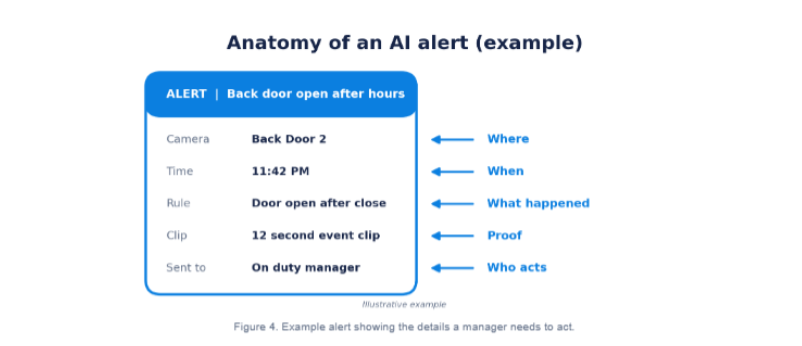
A good alert answers five questions at a glance. What happened, where, when, with what proof, and who acts.
What a useful alert includes
- A plain label for the event, such as door open after close
- The camera name and location
- A time stamp
- A short event clip for fast checking
- A named person or role who receives it
Who should receive which alert
| Alert type | Best recipient | Why |
| After-hours entry | Owner or on-duty manager | Needs a fast decision |
| Drawer or till anomaly | Shift manager | Can verify in the moment |
| Kitchen or safety issue | Head chef or kitchen lead | Closest to the problem |
| Repeat patterns | Area or regional manager | Needs the bigger picture |
How Do You Add AI to Cameras You Already Own?
The best AI security solutions for restaurants plug into your current setup instead of replacing it.
Ask every vendor about existing CCTV compatibility before you ask about price.
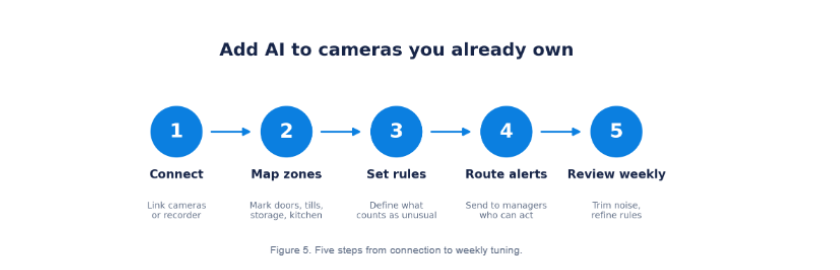
- Connect. Link the platform to your cameras or recorder.
- Map zones. Mark doors, registers, storage, and the kitchen on each view.
- Set rules. Define what counts as unusual, such as entry after closing.
- Route alerts. Send real-time security alerts to the managers who can act.
- Review weekly. Check event clips, trim false alerts, and refine rules.
Rollout tip: Start with two high-risk zones. Expand once alerts feel useful.
How Do You Get Your Staff on Board?
Teams accept new tools faster when they know the purpose. Transparency beats surprise.
Before launch
Explain what the system watches and why. Share the goal: protect jobs, product, and guests.
During the first two weeks
Invite managers to flag noisy alerts. Fix rules quickly so trust builds early.
After launch
Review events as coaching moments, not gotchas. Celebrate safety catches and smoother shifts.
How Far Up the Watch to Act Ladder Does Your System Climb?
This simple framework scores any setup. Use it to compare AI security systems for restaurants side by side.
The best AI security solutions for restaurants reach rung 4, not just rung 2.
The four rungs
- Standard CCTV stops at rung 1.
- Basic motion alerts reach a shaky rung 2.
- Full AI platforms climb all four rungs.
Quick self-score
Give your setup one point per rung it reliably reaches. Ask each vendor for a live example of every rung. A demo that skips rung 3 or 4 is a warning sign.
How Do You Measure Whether AI Security Is Working?
Pick a few numbers before launch. Track them the same way every month.
Five metrics worth tracking
- Inventory variance against sales
- Number of confirmed incidents caught early
- Share of alerts that were useful, not false
- Time from alert to manager response
- Repeat incidents by site or shift
A simple 30, 60, 90-day review
| Window | Focus | Question to answer |
| First 30 days | Tune rules and zones | Are alerts useful or noisy? |
| Day 31 to 60 | Response habits | Do managers act within minutes? |
| Day 61 to 90 | Business impact | Did shrink and repeat incidents shift? |
What Does AI Restaurant Security Cost?
Price depends on scope. Ask for a quote built around your sites, not a generic package.
What Drives The Price
- Number of cameras analyzed
- Number of locations
- Depth of detection features
- Level of monitoring and support
Where the value comes from
Value shows up as fewer unexplained losses, faster response, and less time reviewing footage. Compare that against the margin pressure you already face.
🍽️ Restaurant Video Surveillance
Your Dining Room Deserves More Than a Recording
Add live detection to your current cameras, from the front door to the kitchen line.
Which Questions Should You Ask Every Vendor?
| Ask this | Why it matters |
| Does it work with my current cameras? | Avoids hidden hardware costs |
| Can I see a live alert on a real camera? | Proves the product works |
| How do I tune rules and cut false alerts? | Protects your team from noise |
| Who receives alerts and how fast? | Speed decides whether alerts help |
| Can one dashboard cover all sites? | Patterns need a shared view |
| How long does setup take? | Shows how fast you reach value |
| How are video and data protected? | Guards guests and staff privacy |
How Does Vidan AI Protect Restaurants?
Vidan AI works as restaurant security monitoring software layered over cameras you already have.
What your team gets
- Alerts with short clips for fast verification
- One central view across every location
- Visibility into kitchen hygiene, safety, and staff activity
- A recorded history managers can review without scrubbing hours of tape
Can One Dashboard Watch Every Location?
Short answer: yes. Multi-site owners gain the most.
Without remote monitoring
- Managers learn about incidents the next morning.
- Each site runs its own camera system.
- Patterns across locations stay invisible.
With remote monitoring
- Alerts reach the right person within seconds.
- One dashboard shows events across sites.
- Repeat problems become easy to spot.
AI video surveillance for restaurants lets one manager review events across every site.
Strong remote security monitoring also changes the guard question. Compare the costs in Remote Video Monitoring vs Security Guards: Which Costs Less in 2026?.
What Mistakes Should Restaurants Avoid When Buying AI Security?
Myth: AI means replacing every camera.
Reality: Most platforms analyze feeds you already have.
Myth: More alerts mean better security.
Reality: Constant alerts get ignored. Choose tunable rules.
Myth: AI is only for big chains.
Reality: A single restaurant loses margin to leaks too.
Myth: Staff will resent it.
Reality: Clear policies and posted notices build trust. Check local video monitoring laws first.
In Conclusion
Footage tells you what went wrong last night. Alerts let you fix it tonight. Choosing the best AI security solutions for restaurants comes down to one test. Does it help your team act in time?
Vidan AI passes it. Your current cameras become live protection, with alerts, event clips, and multi-site visibility.
Ready to see it on your own cameras? Speak with the Vidan AI team and find the leaks before they find your margin.